
Is your eSIM Not Working on your iPhone? Guide to Fixing it!
March 2, 2026
A dual SIM phone is a device that supports two SIM cards or eSIM profiles at once. Each SIM connects to a mobile network with its own phone number and plan. This means you can separate work and personal lines on one device, or keep your home line active while using a local SIM card during travel or a travel eSIM (vice-versa).
What Is a Dual SIM?
A dual SIM phone can hold two SIM cards or an eSIM plus a SIM simultaneously. In practice, it’s like having two phones in one. Each SIM has its own mobile network connection, number, and data plan. For example, you might use one SIM for business calls and another for personal use. Many modern phones now support one physical SIM and one eSIM, or even two eSIMs (e.g. some iPhone 13+ models). This allows truly separate lines on one device. Dual SIM devices are popular for splitting work/personal calls, using local data plans abroad, or boosting network coverage.
How Does a Dual SIM Work?
Dual SIM phones typically connect to two networks either one-at-a-time or simultaneously. Most devices use Dual SIM Dual Standby (DSDS): both SIMs stay “on” in the background, but when you actively use one (for a call or data), the other goes temporarily offline. In this mode, you can still receive calls on either number when not on a call. A less common type is Dual SIM Dual Active (DSDA): phones with two transceivers let both SIMs be active at the same time. That means you could be on a call on one line and still receive a call on the other. Dual-SIM devices usually have two distinct IMEI identifiers (one per slot) so carriers can tell the connections apart. You choose which SIM to use for making calls, sending messages, or using mobile data in the phone’s settings or when dialing.
Dual SIM Dual Standby (DSDS)
In Dual SIM Dual Standby phones, both SIM cards remain ready (in standby) for calls and texts. However, if one SIM is actively in use (for example, during a call or data session), the other SIM goes offline until the first becomes idle. DSDS is very common in affordable dual-SIM phones. It lets you manage two numbers without juggling two devices, but remember that only one SIM can actually handle a call or data session at once.
Dual SIM Dual Active (DSDA)
Dual SIM Dual Active phones have two full transceivers, so both SIM cards stay live even during calls. This means you can make or receive calls on one line while using the other line simultaneously. DSDA offers maximum flexibility, but it typically costs more and can use more power (shortening battery life). DSDA is usually found in high-end or specialized phones that need constant availability on both networks.
Single SIM vs Dual SIM vs Hybrid SIM
| Feature | Single SIM | Dual SIM | Hybrid SIM |
|---|---|---|---|
| SIM slots | 1 | 2 | 2 (second slot shared with microSD) |
| Phone numbers | 1 | 2 | 1 or 2 (depending on slot used) |
| Network connections | 1 | Up to 2 (two carriers/networks) | Up to 2 (if second SIM inserted) |
| Use of microSD card | Yes, if phone has separate slot | Usually no (dedicated slots for SIMs only) | Yes (second slot can hold SIM or microSD) |
Single SIM: A standard phone with one SIM slot supports only one network and one phone number.
Dual SIM: Supports two active SIMs (and numbers) at once. You can manage two carriers or plans in one phone.
Hybrid SIM: The second slot can be used either for a second SIM or a microSD card. This gives the flexibility of expandable storage or two SIMs, but you can’t use both at the same time.
Hybrid-SIM phones are common in many Android models. They let you decide whether to use two lines or add extra storage.
How to Check if Your Phone Supports Dual SIM
Look at your phone’s specifications or SIM tray. If the tray has two SIM slots (often labeled SIM1 and SIM2), it’s a dual-SIM phone. On many devices, one slot may be shared for SIM2/microSD (hybrid SIM). You can also check in the settings: for example, Android phones with dual SIM will show options for SIM cards or SIM manager under Network & Internet. iPhones from the iPhone XS/XR and later support dual SIM via one physical nano-SIM slot and one eSIM slot. Newer iPhone 13 and 14 models in some regions even support two active eSIMs. If your settings menu shows options to add a second mobile plan or multiple lines, your phone supports dual SIM.
Benefits of Using a Dual SIM Phone
Separate Work and Personal Numbers: You can dedicate one SIM to work and the other to personal use, so calls and messages stay organized. This means no more juggling two phones.
Cost and Plan Flexibility: Use different carriers or plans for different needs. For example, one SIM can have a cheaper data plan and the other a plan with better call rates. This lets you optimize for cost (and even switch carriers for the best rates).
Travel-Friendly: When traveling abroad, you can keep your home SIM active for occasional calls/texts and insert a local SIM (or eSIM) for data. This avoids high roaming fees and often provides faster connectivity.
Coverage and Connectivity: If one carrier has poor reception in an area, you can switch to the other SIM on a network with better coverage. Dual SIM lets you stay connected when one network is spotty.
Backup Line: If one network fails or its SIM runs out of credit/data, the other SIM keeps you reachable. You effectively have a backup service.
These advantages make dual SIM phones especially useful for business travelers, commuters, and anyone needing two lines or coverage from multiple carriers.
Disadvantages of Dual SIM Phones
Battery Life: Running two network connections uses more power. Dual SIM phones often drain the battery faster than single SIM phones.
App and Service Limitations: Some apps (banking, messaging apps, etc.) may not handle two numbers well. You might need to choose which SIM to use for app verifications or features.
Setup Complexity: Managing two networks means extra settings. You may need to manually select which SIM to use for data or enable roaming on the right line.
Cost and Price: Dual SIM models can be slightly more expensive than their single-SIM counterparts. High-end dual-active phones often cost more.
Confusion Potential: If not labeled clearly, calls or texts could be sent from the wrong line. Always double-check which SIM is active for data, calls or messages.
Despite these drawbacks, most users find the extra flexibility well worth it.
How to Set Up Dual SIM on an iPhone
Modern iPhones (XS, XR and later) support dual SIM with one physical SIM plus one eSIM. iPhone SE (2nd gen) and newer also allow one eSIM plus a physical SIM, while iPhone 13 and newer can even use two active eSIMs. To set it up:
Install the SIMs: Insert your physical SIM into the tray. For the second line, scan the eSIM QR code provided by your carrier via Settings > Cellular > Add Cellular Plan.
Label your plans: Name each line (e.g. “Personal” and “Work”) in Settings to avoid confusion.
Choose defaults: In Settings > Cellular, pick which line is your default for voice, SMS, and which for cellular data. (On iPhone you can enable “Allow Cellular Data Switching” to let the phone switch data lines if needed.)
Make/receive calls: When calling or texting, your iPhone will show a line selector. You can also set a default for each contact.
Apple’s support site has step-by-step guides for activating and managing a second line. Note: Your iPhone must be unlocked (not carrier-locked) to use two different carriers.
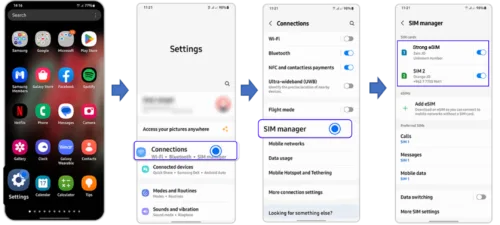
How to Set Up Dual SIM on Android
Most dual-SIM Android phones work similarly. First, check your SIM tray for two slots (or one plus microSD slot if hybrid). Then:
Insert SIM(s): Place each nano-SIM in its slot. If using an eSIM, look in Settings > Network & internet > SIM cards for an option to “Add eSIM” or “Download a SIM” from a QR code.
Check out how to activate eSIM on Android.
Configure in Settings: Go to Settings > Network & Internet (or Connections) > SIM cards (or SIM manager). You will see both SIMs listed.
Label and select defaults: Assign a name to each SIM line (e.g. “Personal,” “Travel”). Choose which SIM to use by default for calls, SMS, and mobile data.
Switch as needed: You can change the data SIM or voice SIM anytime in Settings, and many Androids allow switching SIMs on the fly when calling or texting.
For example, on Samsung phones: Settings > Connections > SIM card manager. On Google Pixel: Settings > Network & internet > SIMs. Each manufacturer’s menu may look slightly different, but the principle is the same. If in doubt, check your phone’s manual or carrier guide.
How to Switch Between SIM Cards on a Dual SIM Phone
Switching is usually quick. On most Android phones, go to the SIM settings (often in Settings > SIM cards or Mobile networks) and choose the desired line for voice or data. Many phones also let you pick a SIM just before dialing a number. On iPhone, tap Settings > Cellular (or Mobile Data), then set your Default Voice Line and Cellular Data preferences. When composing a message or dialing, you may see an option at the top to switch lines. If you’re on a call, some phones allow selecting the other SIM from the call screen to switch lines mid-call.
Dual SIM vs eSIM: What’s the Difference
Dual SIM refers to using two lines on one device. These lines can be on physical SIM cards, on eSIM profiles, or one of each. An eSIM is a programmable digital SIM embedded in the device. Unlike a physical SIM card, an eSIM can be provisioned over the air by carriers. With an eSIM, you don’t insert a physical card, and you can switch carriers or plans by downloading profiles.
A dual-SIM phone can use an eSIM as one of its lines. For example, many phones allow one physical SIM + one eSIM active at once. Some even support two eSIMs. Strong eSIM notes that this lets you keep your home carrier on the physical SIM and use an eSIM for affordable travel data. In summary, dual SIM is about two lines (however they are implemented), while eSIM is just a technology for one of those lines digital vs physical. Often, the best setup is to use both together: keep a physical SIM for your main service and use an eSIM for additional plans or travel.
Is Dual SIM Useful for International Travel?
Absolutely. Dual SIM phones are ideal for travelers. You can keep your home SIM active (for incoming calls/texts from family) while adding a local SIM or eSIM with a data plan. This way you avoid roaming charges. For instance, Google’s guide mentions that travelers can “pop in a local SIM in the second slot” to stay connected without expensive roaming. The Points Guy recommends using a local SIM abroad to avoid daily roaming fees from US carriers.
With one dual-SIM device, you could use your regular number for voice calls and have a separate eSIM that you buy for data in Europe or Asia. That lets you land in a new country and be online immediately (no hunting for a store). In short, dual SIM provides flexibility: two active lines means you never lose touch with home while saving on local rates and data costs.
Figure: A traveler uses a smartphone on an airplane, illustrating how dual SIM lets you keep a home number active (e.g., on one SIM) while using a local or eSIM data plan (on the other) to stay connected abroad.
How to Choose the Right Dual SIM Phone
When picking a dual SIM phone, consider why you need it. If it’s for travel, check which phones have good eSIM support or dual SIM slots for the regions you visit. For business use, think about battery life—running two radios can drain power faster. Make sure the phone is unlocked or compatible with the carriers you plan to use. Look for convenient SIM management features like easy line labeling or quick toggling. Popular dual-SIM models come from Samsung (Galaxy series), Apple (recent iPhones with eSIM), Google (Pixel 3a and up), Xiaomi, and others. In short, get a phone that balances performance and ease-of-use for dual lines. Keep an eye on battery capacity and manufacturer support for dual networks.
Should You Use a Dual SIM Phone?
If you juggle work and personal numbers, travel often, or want backup coverage, a dual SIM phone is very handy. It lets you manage two lines from one handset. However, if you only ever use a single number or rarely travel, a regular phone may be simpler. Dual SIM adds a bit of complexity (more settings to manage), but for many people the flexibility outweighs the hassle. Ultimately, if these advantages match your needs, using a dual SIM phone makes sense.
Frequently Asked Questions About Dual SIM
Can you use two phone numbers on one phone?
Yes. A dual SIM phone is designed for exactly this. You can have two active numbers (even on different carriers) in the same device.
Does dual SIM drain battery faster?
Typically, yes. With two connections to manage, the phone consumes more power. Expect somewhat shorter battery life than a single-SIM phone, so choose a device with strong battery capacity.
Can both SIM cards use data at the same time?
Usually only one SIM can be the active data line at a time. You select a default data SIM in settings. Some phones (like iPhones with iOS 26) let you enable “Allow Cellular Data Switching,” which can automatically switch data to the other line if needed. But in most cases only one SIM is used for mobile data at once.
Is dual SIM better for travel?
Yes. Dual SIM lets you keep your primary number active while you add a local or travel SIM for data. This avoids international roaming fees and ensures you always have coverage.
Can you use eSIM and physical SIM together?
Absolutely. Most modern dual SIM phones allow one eSIM and one physical SIM simultaneously. For example, you could keep your personal number on a physical SIM and use an eSIM plan for work or travel. This combination is often the most convenient setup.
How many active lines can I have?
That depends on the phone. Many dual SIM phones can manage two active lines. Some new models (like iPhone 15 and later Android flagships) even support two active eSIMs or dual SIM dual active, letting you handle two data calls at once. Check your phone’s specs for exact support.