
Best Travel Apps for South Korea (2026)
febrero 19, 2026
Is your eSIM Not Working on your iPhone? Guide to Fixing it!
marzo 2, 2026
Cellular data, also called mobile data, is the internet connection your phone uses when it is not connected to Wi-Fi.
When you browse websites, use Instagram, check maps, or stream music outside your home, you are using cellular data. Your phone connects to nearby cell towers operated by your carrier, which gives you internet access almost anywhere there is signal.
If you have ever wondered why your phone works on the street but not in airplane mode, this is why.
What Is Cellular Data?
Cellular data is internet access delivered through your mobile carrier’s network.
Instead of using a Wi-Fi router in your home or office, your phone connects to a cellular tower. That tower connects you to the internet.
Every time you:
Open a website
Send an email
Scroll social media
Use Google Maps
Stream music or video
you are using cellular data if Wi-Fi is turned off.
Data usage is measured in megabytes (MB) and gigabytes (GB). Most phone plans give you a set amount of data per month. Some plans offer unlimited data, but speeds may slow down after you pass a certain limit.
How Does Cellular Data Work?
When mobile data is turned on, your phone sends a signal to the nearest cell tower.
Here’s what happens behind the scenes:
Your phone connects to a nearby tower.
The tower routes your request through your carrier’s network.
The carrier connects you to the website or app you are trying to use.
The data travels back to your phone in small digital packets.
Modern networks like 4G LTE and 5G make this process extremely fast. That is why videos load quickly and apps respond instantly in areas with strong signal.
If the signal is weak, data may feel slow because your phone is struggling to maintain a strong connection to the tower.
What Is the Difference Between Cellular Data and Mobile Data?
There is no difference.
“Cellular data” and “mobile data” mean the same thing.
Both refer to internet access provided by your phone carrier over a wireless network.
In the United States, “cellular data” is used more often. In other countries, people usually say “mobile data.” Technically, they are identical.
Cellular Data vs Wi-Fi: What’s the Difference?
Both let you access the internet. The difference is where the connection comes from.
Wi-Fi:
Comes from a local router
Works within a limited range
Usually does not count against your phone plan
Often faster at home
Cellular data:
Comes from your carrier’s towers
Works almost anywhere with signal
Counts toward your monthly data allowance
Ideal when traveling or outside
If you are at home, Wi-Fi is usually better.
If you are in a taxi in Rome or walking through an airport, cellular data keeps you connected.
Does Cellular Data Cost Money?
Yes.
Cellular data is included in your phone plan, and you pay for that plan monthly or prepaid.
There are two main types:
Limited plans
You get a fixed amount of GB per month.
If you exceed it, your speed may slow down or you may pay extra.
Unlimited plans
No strict data cap. (Still limited)
Speeds may slow after heavy usage.
Often more expensive.
If you travel internationally and use roaming, charges can increase significantly. That is why many travelers look into international plans or travel eSIM options before a trip.
How Much Cellular Data Do Apps Use?
Different activities use very different amounts of data.
Here are general estimates per hour:
| Activity | Approximate Data Usage |
|---|---|
| Web browsing | ~ 50 MB |
| Social media scrolling | ~ 150 MB |
| Streaming video (HD) | ~ 1 GB |
| Music streaming | ~ 100 MB |
| Navigation (Google Maps) | ~ 10 MB |
| ~ 4 MB |
Streaming video uses the most data.
Maps and email use very little.
If you are traveling and using Google Maps daily but not streaming video, your usage will stay relatively low. If you are watching Netflix on mobile data, it will disappear quickly.
How Much Cellular Data Do You Need Per Month?
It depends on your habits.
Light users
Mostly on Wi-Fi
Occasional browsing and messaging
1–3 GB per month is usually enough
Moderate users
Daily browsing and social media
Some streaming
5–10 GB per month
Heavy users
Frequent video streaming
Video calls
Hotspot use
15 GB or more per month
For Travelers
Travel usage is different.
If you are:
Using maps daily
Booking rides
Messaging on WhatsApp
Checking flights
You may need 3–10 GB for a typical 1–2 week trip.
If you plan to stream video or work remotely, you will need more.
This is why many travelers check into How Much Data Do I Need for Travel before choosing a plan.
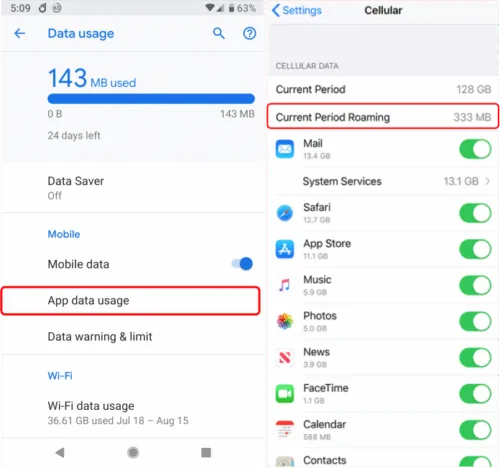
How to Check Cellular Data Usage on iPhone and Android
On iPhone
Go to Settings
Tap Cellular
Scroll down to see data usage by app
You can reset statistics at the bottom of the page at the start of your billing cycle.
On Android
Open Settings
Tap Network & Internet
Select Data Usage
You will see total usage and app-by-app breakdown.
You can also set data warnings to avoid going over your limit.
Why Is My Cellular Data Not Working?
If your data suddenly stops, check these common issues:
No Signal or “SOS”
When you get No SIM (fix), you may be in an area with weak coverage.
Try toggling airplane mode on and off.
Data Roaming Is Off
If you are abroad, roaming must be enabled in settings.
Data Limit Reached
You may have used all your monthly data.
Check your carrier app or settings.
SIM or eSIM Issue
If you recently switched plans or installed an eSIM, restart your device.
If problems continue, contact your carrier.
What Is Data Roaming?
Data roaming happens when your phone connects to a network outside your home carrier’s coverage area.
This usually occurs when you travel internationally.
For example, if you live in the US and your phone connects to a network in France, you are roaming.
Roaming allows you to stay connected, but it can be expensive. That is why it is important to understand What Is Data Roaming before traveling.
How to Avoid Roaming Charges When Traveling Internationally
International roaming charges can be very high, try to use cheaper data alternatives.
Here are smarter options:
1. Use Wi-Fi Only
Turn on airplane mode and manually enable Wi-Fi.
2. Buy an International Plan
Many US carriers offer daily travel passes.
3. Use a Local SIM
Buying a SIM card in your destination country often costs much less than roaming.
4. Use an eSIM for Travel
Travel eSIMs let you install a data plan digitally before your trip.
You can compare options in:
For most international travelers, eSIMs are now the easiest and most cost-effective solution.
How to Save Cellular Data and Reduce Data Usage
If you want to stretch your data:
Use Wi-Fi whenever possible
Lower streaming quality
Disable background app refresh
Turn off automatic app updates on cellular
Enable Low Data Mode
Small adjustments make a big difference over a month.
Is Cellular Data Safe to Use?
Yes. Cellular data is generally secure.
Modern 4G and 5G networks encrypt your connection between your phone and the carrier. This makes it safer than many public Wi-Fi networks.
Public Wi-Fi in airports or cafes can be risky if unsecured.
If you are handling sensitive information while traveling, cellular data is often the safer choice.
FAQ About Cellular Data
What is cellular data?
Cellular data is internet access provided through your mobile carrier’s network. Your phone connects to nearby cell towers instead of a Wi-Fi router to access websites, apps, email, maps, and streaming services.
Is cellular data the same as mobile data?
Cellular data and mobile data mean the same thing. Both refer to internet service delivered over a carrier’s wireless network rather than through Wi-Fi.
Does cellular data cost extra money?
Cellular data is included in your phone plan. If you have a limited plan, you pay for a specific amount of data each month. Going over that limit may result in slower speeds or additional charges. International roaming can significantly increase costs if not managed properly.
What uses the most cellular data?
High-definition video streaming uses the most data, followed by video calls and large app downloads. Music streaming uses much less, while browsing websites, checking email, and using maps consume relatively small amounts.
How much data do I need for travel?
The amount depends on your habits. Light travelers using maps and messaging apps may need 3–5 GB for a short trip. Moderate users may need 5–10 GB. Heavy users who stream or work remotely may require 10 GB or more. Planning ahead helps avoid roaming charges or running out of data.
Why is my cellular data not working abroad?
Common reasons include disabled data roaming, lack of coverage, incorrect carrier settings, or an inactive SIM or eSIM. Checking roaming settings and restarting the device often resolves the issue. If not, contacting the carrier is the next step.
Does cellular data drain battery faster than Wi-Fi?
Cellular data typically uses more battery power than Wi-Fi, especially in areas with weak signal. When the phone struggles to maintain a connection to a tower, battery usage increases.
Is cellular data safer than public Wi-Fi?
Cellular connections are encrypted between your device and the carrier, which makes them more secure than many public Wi-Fi networks. Public hotspots can be vulnerable if not properly secured, so cellular data is often the safer option for banking, logins, and sensitive activity.